Integrate Open Telemetry for Python Application
What is OpenTelemetry?
Open Telemetry is a set of tools, APIs, and SDKs that capture distributed traces, metrics, and logs from applications, providing a standard method to instrument and export telemetry data to different backend analysis platforms.
Prerequisites
Ubuntu with sudo privileges
Python3 with Flask
Install Python3 on Ubuntu
sudo apt install python3
Check the version installed python with below command.
python3 -V
Create Python3 Application with Flask
Create a Simple Python application with Flask
mkdir otel-getting-started
cd otel-getting-started
installs the python3.12-venv package on your Ubuntu-based system using the apt package manager.
sudo apt install python3.12-venv
Output:
ubuntu@ip-172-31-9-98:~/otel-getting-started$ sudo apt install python3.12-venv
Reading package lists... Done
Building dependency tree... Done
Reading state information... Done
The following additional packages will be installed:
  libpython3.12-minimal libpython3.12-stdlib libpython3.12t64 python3-pip-whl python3-setuptools-whl python3.12 python3.12-minimal
Suggested packages:
  python3.12-doc binutils binfmt-support
The following NEW packages will be installed:
  python3-pip-whl python3-setuptools-whl python3.12-venv
The following packages will be upgraded:
  libpython3.12-minimal libpython3.12-stdlib libpython3.12t64 python3.12 python3.12-minimal
5 upgraded, 3 newly installed, 0 to remove and 46 not upgraded.
Need to get 10.6 MB of archives.
After this operation, 2781 kB of additional disk space will be used.
Do you want to continue? [Y/n] y
Get:1 http://ap-south-1.ec2.archive.ubuntu.com/ubuntu noble-updates/main amd64 libpython3.12t64 amd64 3.12.3-1ubuntu0.1 [2339 kB]
Get:2 http://ap-south-1.ec2.archive.ubuntu.com/ubuntu noble-updates/main amd64 python3.12 amd64 3.12.3-1ubuntu0.1 [651 kB]
Get:3 http://ap-south-1.ec2.archive.ubuntu.com/ubuntu noble-updates/main amd64 libpython3.12-stdlib amd64 3.12.3-1ubuntu0.1 [2069 kB]
Get:4 http://ap-south-1.ec2.archive.ubuntu.com/ubuntu noble-updates/main amd64 python3.12-minimal amd64 3.12.3-1ubuntu0.1 [2334 kB]
Get:5 http://ap-south-1.ec2.archive.ubuntu.com/ubuntu noble-updates/main amd64 libpython3.12-minimal amd64 3.12.3-1ubuntu0.1 [832 kB]
Get:6 http://ap-south-1.ec2.archive.ubuntu.com/ubuntu noble/universe amd64 python3-pip-whl all 24.0+dfsg-1ubuntu1 [1702 kB]
Get:7 http://ap-south-1.ec2.archive.ubuntu.com/ubuntu noble/universe amd64 python3-setuptools-whl all 68.1.2-2ubuntu1 [715 kB]
Get:8 http://ap-south-1.ec2.archive.ubuntu.com/ubuntu noble-updates/universe amd64 python3.12-venv amd64 3.12.3-1ubuntu0.1 [5678 B]
Fetched 10.6 MB in 0s (66.7 MB/s)
Activates a virtual environment named venv located in the current directory.
source ./venv/bin/activate
The source command runs the activation script located at ./venv/bin/activate within the current shell session.
Install the Flask with below command.
pip install flask
Output.
(venv) ubuntu@ip-172-31-9-98:~/otel-getting-started$  pip install flask
Collecting flask
  Downloading flask-3.0.3-py3-none-any.whl.metadata (3.2 kB)
Collecting Werkzeug>=3.0.0 (from flask)
  Downloading werkzeug-3.0.3-py3-none-any.whl.metadata (3.7 kB)
Collecting Jinja2>=3.1.2 (from flask)
  Downloading jinja2-3.1.4-py3-none-any.whl.metadata (2.6 kB)
Collecting itsdangerous>=2.1.2 (from flask)
  Downloading itsdangerous-2.2.0-py3-none-any.whl.metadata (1.9 kB)
Collecting click>=8.1.3 (from flask)
  Downloading click-8.1.7-py3-none-any.whl.metadata (3.0 kB)
Collecting blinker>=1.6.2 (from flask)
  Downloading blinker-1.8.2-py3-none-any.whl.metadata (1.6 kB)
Collecting MarkupSafe>=2.0 (from Jinja2>=3.1.2->flask)
  Downloading MarkupSafe-2.1.5-cp312-cp312-manylinux_2_17_x86_64.manylinux2014_x86_64.whl.metadata (3.0 kB)
Downloading flask-3.0.3-py3-none-any.whl (101 kB)
   ━━━━━━━━━━━━━━━━━━━━━━━━━━━━━━━━━━━━━━━━ 101.7/101.7 kB 7.7 MB/s eta 0:00:00
Downloading blinker-1.8.2-py3-none-any.whl (9.5 kB)
Downloading click-8.1.7-py3-none-any.whl (97 kB)
   ━━━━━━━━━━━━━━━━━━━━━━━━━━━━━━━━━━━━━━━━ 97.9/97.9 kB 12.5 MB/s eta 0:00:00
Downloading itsdangerous-2.2.0-py3-none-any.whl (16 kB)
Downloading jinja2-3.1.4-py3-none-any.whl (133 kB)
   ━━━━━━━━━━━━━━━━━━━━━━━━━━━━━━━━━━━━━━━━ 133.3/133.3 kB 16.5 MB/s eta 0:00:00
Downloading werkzeug-3.0.3-py3-none-any.whl (227 kB)
   ━━━━━━━━━━━━━━━━━━━━━━━━━━━━━━━━━━━━━━━━ 227.3/227.3 kB 27.1 MB/s eta 0:00:00
Downloading MarkupSafe-2.1.5-cp312-cp312-manylinux_2_17_x86_64.manylinux2014_x86_64.whl (28 kB)
Installing collected packages: MarkupSafe, itsdangerous, click, blinker, Werkzeug, Jinja2, flask
Successfully installed Jinja2-3.1.4 MarkupSafe-2.1.5 Werkzeug-3.0.3 blinker-1.8.2 click-8.1.7 flask-3.0.3 itsdangerous-2.2.0
(venv) ubuntu@ip-172-31-9-98:~/otel-getting-started$ flask run -p 8080 -h 0.0.0.0
Usage: flask run [OPTIONS]
Try 'flask run --help' for help.
Build and run Flask App using below command.
flask run -p 8080 -h 0.0.0.0
-p 8080: Sets the port to 8080, making your Flask app accessible at this port.
-h 0.0.0.0: sets the host to 0.0.0.0, allowing Flask to listen on all network interfaces so your app can be accessed from any device on the same network.
Output:
(venv) ubuntu@ip-172-31-9-98:~/otel-getting-started$ flask run -p 8080 --host=0.0.0.0
 * Debug mode: off
INFO:werkzeug:WARNING: This is a development server. Do not use it in a production deployment. Use a production WSGI server instead.
 * Running on all addresses (0.0.0.0)
 * Running on http://127.0.0.1:8080
 * Running on http://172.31.9.98:8080
INFO:werkzeug:Press CTRL+C to quit
WARNING:app:Anonymous player is rolling the dice: 3
INFO:werkzeug:103.210.200.135 - - [13/Aug/2024 13:42:46] "GET /rolldice HTTP/1.1" 200 -
INFO:werkzeug:103.210.200.135 - - [13/Aug/2024 13:42:46] "GET /favicon.ico HTTP/1.1" 404
Create a file with app.py and add the below code
from random import randint
from flask import Flask, request
import logging

app = Flask(__name__)
logging.basicConfig(level=logging.INFO)
logger = logging.getLogger(__name__)


@app.route("/rolldice")
def roll_dice():
    player = request.args.get('player', default=None, type=str)
    result = str(roll())
    if player:
        logger.warning("%s is rolling the dice: %s", player, result)
    else:
        logger.warning("Anonymous player is rolling the dice: %s", result)
    return result


def roll():
    return randint(1, 6)
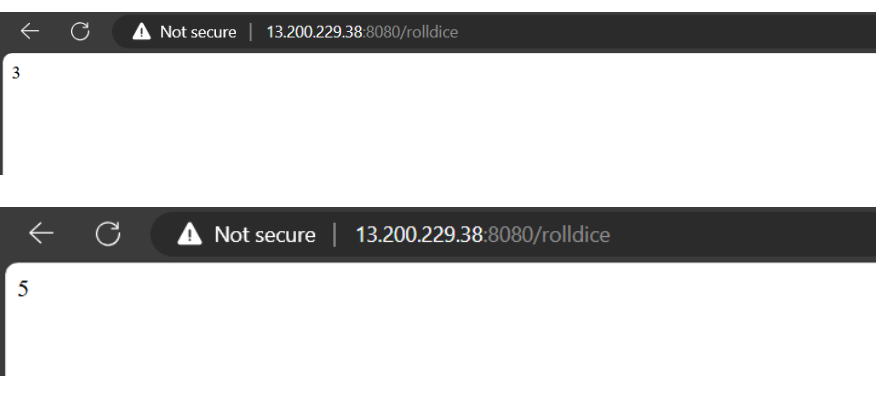
Run the application with the following command in your web browser to ensure it is working.
http://IP:8080/rolldice
Output
(venv) ubuntu@ip-172-31-9-98:~/otel-getting-started$ flask run -p 8080 --host=0.0.0.0
 * Debug mode: off
INFO:werkzeug:WARNING: This is a development server. Do not use it in a production deployment. Use a production WSGI server instead.
 * Running on all addresses (0.0.0.0)
 * Running on http://127.0.0.1:8080
 * Running on http://172.31.9.98:8080
INFO:werkzeug:Press CTRL+C to quit
WARNING:app:Anonymous player is rolling the dice: 5
INFO:werkzeug:103.210.200.135 - - [13/Aug/2024 14:06:25] "GET /rolldice HTTP/1.1" 200 -
WARNING:app:Anonymous player is rolling the dice: 1
INFO:werkzeug:103.210.200.135 - - [13/Aug/2024 14:07:17] "GET /rolldice HTTP/1.1" 200 -
WARNING:app:Anonymous player is rolling the dice: 5
INFO:werkzeug:103.210.200.135 - - [13/Aug/2024 14:07:19] "GET /rolldice HTTP/1.1" 200 -
WARNING:app:Anonymous player is rolling the dice: 2
INFO:werkzeug:103.210.200.135 - - [13/Aug/2024 14:07:20] "GET /rolldice HTTP/1.1" 200 -
WARNING:app:Anonymous player is rolling the dice: 1
INFO:werkzeug:103.210.200.135 - - [13/Aug/2024 14:07:20] "GET /rolldice HTTP/1.1" 200 -
Integrate Open Telemetry for Python Application
Install the opentelemetry-distro package, which includes the OpenTelemetry API, SDK, and the tools opentelemetry-bootstrap and opentelemetry-instrument.
pip install opentelemetry-distro
Run the opentelemetry-bootstrap command.
opentelemetry-bootstrap -a install
You can now use opentelemetry-instrument to run your instrumented app and display the output in the console.
export OTEL_PYTHON_LOGGING_AUTO_INSTRUMENTATION_ENABLED=true
OpenTelemetry instrumentation with a Flask application
opentelemetry-instrument \
    --traces_exporter console \
    --metrics_exporter console \
    --logs_exporter console \
    --service_name dice-server \
    flask run -p 8080 -h 0.0.0.0
opentelemetry-instrument: This is the command-line tool provided by the OpenTelemetry Python SDK to instrument applications.
--traces_exporter console: Configures OpenTelemetry to export traces to the console for immediate inspection.
--metrics_exporter console: Configures OpenTelemetry to export metrics to the console for immediate inspection.
--logs_exporter console: Configures OpenTelemetry to export logs to the console for immediate inspection.
--service_name dice-server: Sets the service name to "dice-server" for identification in telemetry data.
flask run -p 8080 -h 0.0.0.0: Starts a Flask application on port 8080, accessible from all network interfaces. Run the Python App on the browser and reload the page a few times.
http://IP:8080/rolldice
After a while you should see the spans printed in the console, such as the following.
Output
{
    "body": "116.74.237.233 - - [13/Aug/2024 12:21:30] \"GET /rolldice HTTP/1.1\" 200 -",
    "severity_number": "<SeverityNumber.INFO: 9>",
    "severity_text": "INFO",
    "attributes": {
        "code.filepath": "/home/ubuntu/otel-getting-started/venv/lib/python3.12/site-packages/werkzeug/_internal.py",
        "code.function": "_log",
        "code.lineno": 97
    },
    "dropped_attributes": 0,
    "timestamp": "2024-08-13T12:21:30.501682Z",
    "observed_timestamp": "2024-08-13T12:21:30.501708Z",
    "trace_id": "0x00000000000000000000000000000000",
    "span_id": "0x0000000000000000",
    "trace_flags": 0,
    "resource": {
        "attributes": {
            "telemetry.sdk.language": "python",
            "telemetry.sdk.name": "opentelemetry",
            "telemetry.sdk.version": "1.26.0",
            "service.name": "dice-server",
            "telemetry.auto.version": "0.47b0"
        },
        "schema_url": ""
    }
}
{
    "body": "Anonymous player is rolling the dice: 6",
    "severity_number": "<SeverityNumber.WARN: 13>",
    "severity_text": "WARN",
    "attributes": {
        "code.filepath": "/home/ubuntu/otel-getting-started/app.py",
        "code.function": "roll_dice",
        "code.lineno": 17
    },
    "dropped_attributes": 0,
    "timestamp": "2024-08-13T12:21:45.973549Z",
    "observed_timestamp": "2024-08-13T12:21:45.973600Z",
    "trace_id": "0x00000000000000000000000000000000",
    "span_id": "0x0000000000000000",
    "trace_flags": 0,
    "resource": {
        "attributes": {
            "telemetry.sdk.language": "python",
            "telemetry.sdk.name": "opentelemetry",
            "telemetry.sdk.version": "1.26.0",
            "service.name": "dice-server",
            "telemetry.auto.version": "0.47b0"
        },
        "schema_url": ""
    }
}